

Gambibet Mobile App
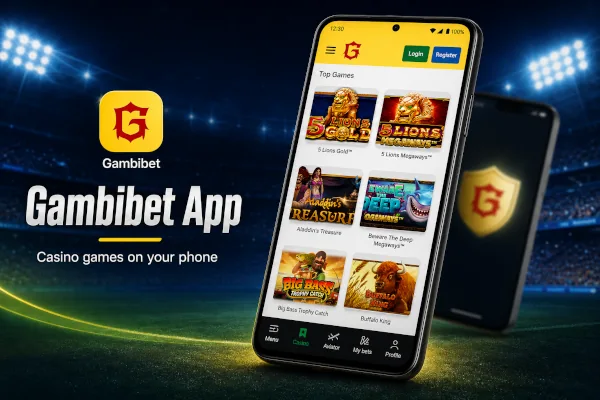
Gambibet gives adult players in The Gambia mobile access to the sportsbook, live events, casino games, payments and personal account tools. The platform can be opened in a normal browser or added to the phone home screen as a Progressive Web App.
A Progressive Web App is commonly called a PWA. It uses the Gambibet website while providing an icon and an app style window on a supported smartphone. Players do not need a separate account when they install it. The registered phone number, password, balance, betting history and available rewards remain connected with the same Gambibet profile.
The PWA is available for compatible Android and iOS smartphones. Installation takes place through the browser rather than through a traditional store download. This helps players avoid unofficial application files and gives direct access to the current website version.
Gambi Bet is intended only for players aged eighteen or older who are legally allowed to gamble in The Gambia.
Benefits of the Gambibet PWA
The installed version gives players a direct route to Gambibet from the phone home screen. It removes the need to type the website address whenever the platform is opened.
Main PWA benefits include
- Home screen access through a Gambibet icon
- One account across mobile and desktop devices
- A layout adapted to smaller touch screens
- Direct entry to sports and live betting
- Access to slots, crash games and live casino
- Account history and payment controls in one place
- Browser based updates without a manual store download
- Lower installation requirements than many native applications
The PWA does not create a second Gambibet profile. A player who already has an account should sign in with the existing mobile number and password.
How to Install Gambibet
Android Installation Guide
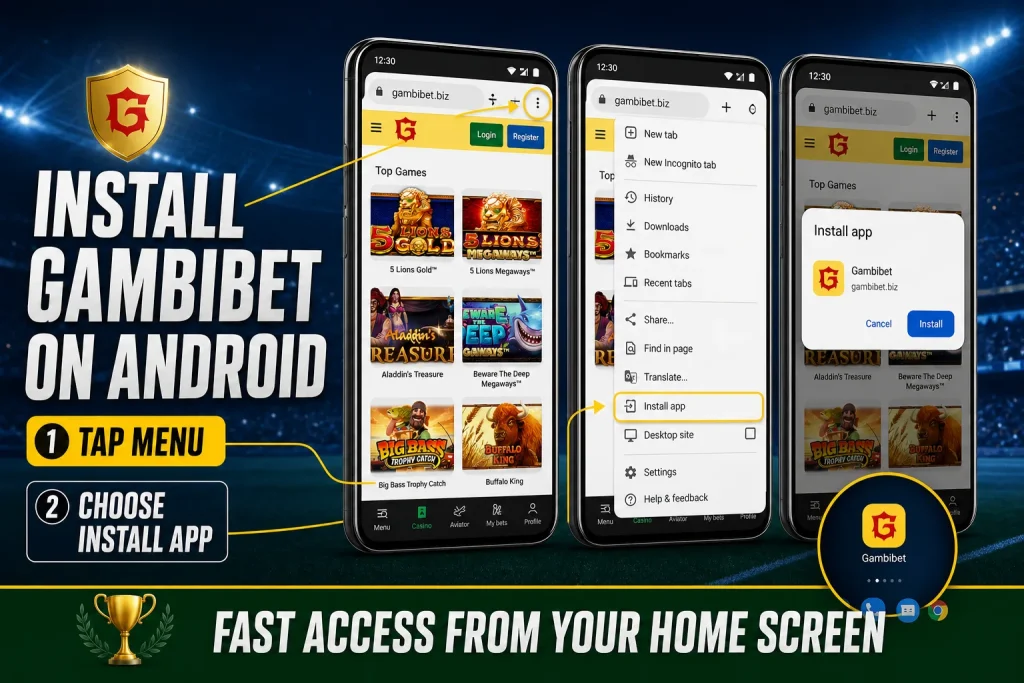
Google Chrome can install a supported web app from the browser menu. The wording may appear as Install app or Add to Home screen depending on the Android device and Chrome version.
- Unlock the Android phone and open Google Chrome
- Enter the official Gambibet website address
- Wait until the page has finished loading
- Open the Chrome menu beside the address bar
- Select Add to Home screen
- Choose Install when the web app option appears
- Follow the instructions displayed by Android
- Return to the home screen and find the Gambibet icon
- Open the installed PWA and sign in with the existing account
Some Android devices show Create shortcut instead of Install. A shortcut still provides fast access, but it may open with more browser controls than a fully installed PWA.
The install option may not appear inside a browser opened through Facebook, Instagram, Gmail or another application. Copy the Gambibet address and open it directly in Chrome before repeating the steps.
iPhone Installation Guide
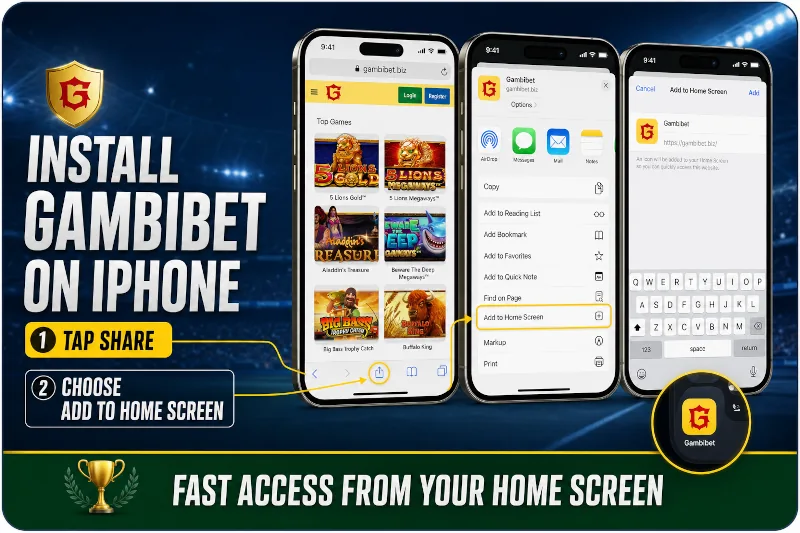
Apple allows a website to be added as a web app through Safari. The process does not require the App Store.
- Unlock the iPhone and open Safari
- Visit the official Gambibet website
- Allow the page to load completely
- Open the Safari Share menu
- Scroll through the available actions
- Select Add to Home Screen
- Enable Open as Web App when the option is displayed
- Review the Gambibet name and icon
- Select Add to finish the installation
- Open Gambibet from the new home screen icon
When Add to Home Screen is missing, scroll to the bottom of the Safari action list and select Edit Actions. Add the required action and return to the Share menu.
The icon is added only to the iPhone used for installation. A player who changes phones must repeat the installation on the new device and continue using the existing Gambibet account.
Updating or Removing Gambibet App
PWA content is normally updated through the website. Opening the app while connected allows the browser to obtain current platform files.
On Android, the web app can be removed through the application settings or from the home screen. On iPhone, it can be removed like another home screen app.
Removing the PWA does not close the Gambibet account. The player can continue through a browser or install the PWA again later.
What the Gambibet Mobile App Can Do
The PWA connects the player with the main Gambibet products and account functions available through the mobile website.
Sports Betting
Players can browse sports, competitions, fixtures and available markets from a smartphone. Football is central to the sportsbook, while basketball, tennis and other events can also be available.
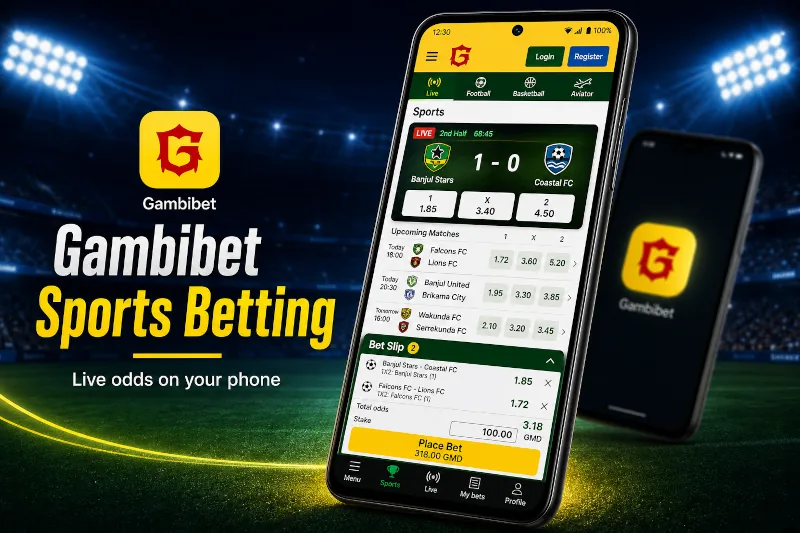
The mobile betting slip allows the player to select a market, enter a stake, review the total odds and submit the bet. Accepted tickets can be viewed through the personal account history.
Sports markets can include
- Match winner and 1X2 selections
- Double chance
- Total goals or total points
- Both teams to score
- Handicap markets
- Correct score
- Player selections
- Corners and cards
- Single and combined bets
Every selection should be reviewed before confirmation because odds can change while the betting slip is open.
Live Betting
The Gambibet PWA allows players to follow available markets after an event has started. Live prices can update quickly when the score, match time or other event information changes.
A stable mobile connection is important during live betting. A weak signal can delay a price update or prevent a request from reaching the server before the market closes.
The ticket is accepted only when the Gambibet system confirms it. A selection remaining on the screen does not prove that the bet was registered.
Casino Games
The mobile casino provides slots, crash games, table games, live casino, instant win titles, Megaways games, scratch games and other categories available in the current lobby.
Players can open games from providers such as Pragmatic Play, Wazdan, Fazi, RubyPlay, SmartSoft and other studios. Availability can change as new games are added or provider content is updated.
Mobile casino options include
- Slots with free spins and bonus features
- Aviator and other crash style games
- Roulette, blackjack and baccarat
- Streamed live dealer tables
- Mines and other instant win formats
- Megaways slots with changing reel layouts
- Light games for faster loading
Live dealer games generally use more mobile data than standard slots. A stronger connection is recommended before opening a video table.
Payments and Account Tools
After login, players can open the cashier, review available payment methods and check transaction history. The methods shown can depend on the account and current provider availability.
The PWA can also provide access to personal information, betting history, freebet coupons, casino rewards and account recovery tools.
Payment confirmation should be completed only through the official Gambibet interface and the trusted payment service selected by the player.
Is the Gambibet App Safe
A PWA can offer a safe route to Gambibet when it is installed from the official website and used on a protected device. It avoids the need to download an application file from an unknown third party.
The installed app still connects with an online account. Its safety therefore depends on the website, the browser, the device and the way the player protects login and payment information.
Safe mobile use includes
- Installing Gambibet only from the official website
- Keeping Android, iOS and the browser updated
- Protecting the phone with a screen lock
- Using a private password for the Gambibet account
- Keeping SMS verification codes private
- Avoiding public or unknown wireless networks during payments
- Signing out before giving the device to another person
- Checking the website address before entering account details
Customer support can request details needed to locate the correct player profile. A genuine support process should not require the player to reveal a password, mobile wallet PIN or one time SMS code.
The PWA should not be installed from a link sent by an unknown person. Messages promising guaranteed winnings, account upgrades or payment release can be attempts to steal login information.
Does the App Work Offline
The Gambibet PWA may keep limited interface files on the phone, but real money functions require an active internet connection.
Sports prices, live markets, account balances, payments and casino results come from online systems. A player should not attempt to place a bet or confirm a transaction while the connection is unstable.
An offline screen or previously loaded page does not show guaranteed current information. Reconnect and refresh before making a financial decision.
Possible Gambibet App Problems
Most PWA problems come from the browser, connection, stored website data or device settings rather than from the account password.
The Install Option Is Missing
The website may have been opened inside another application rather than a supported browser. Open the address directly in Chrome on Android or Safari on iPhone.
On Android, look for both Install app and Add to Home screen. On iPhone, use Edit Actions when Add to Home Screen is hidden from the Safari Share menu.
The Icon Opens a Normal Browser Tab
The phone may have created a shortcut instead of a fully installed web app. Remove the icon and repeat the browser installation process.
On iPhone, make sure Open as Web App is enabled before selecting Add.
The App Returns to the Login Screen
An expired session or damaged browser cookie can create a repeated login loop. Close the PWA, open Gambibet in a private browser window and test the account.
When browser login works, clear only the saved Gambibet site data and install the PWA again if necessary. Do not create another player account.
The App Shows an Old Page
Stored PWA files can remain after a website update. Close the app completely and reopen it while connected to the internet.
If the old version remains, remove the home screen app, clear Gambibet browser data and install the current version again.
Casino Games Do Not Load
A casino title can fail because of a weak connection, blocked cookies, disabled JavaScript, provider maintenance or limited device memory.
Close unused applications, allow required browser functions and try another game. If one title continues to fail while other games work, record the game name and contact support.
Live Betting Updates Slowly
Mobile network delays can make live prices or event information appear behind the actual event. Change to a stable connection and reopen the market.
Never assume that a live selection was accepted until it appears in the betting history.
The Screen Is Blank After an Update
Old cached resources can conflict with a new website release. Restart the phone and clear the Gambibet site data in the browser.
Reinstalling the PWA changes the home screen installation but does not delete the Gambibet account or balance.
Payment Confirmation Is Interrupted
Do not immediately repeat a deposit when the connection fails during confirmation. First check the Gambibet transaction history and the mobile money account.
If the result is unclear, contact support with the amount, time, payment method and transaction reference. Never provide a wallet PIN or SMS code.
Notifications Do Not Appear
Notifications depend on website support, user permission and phone settings. Confirm that notifications are allowed for the Gambibet web app and that battery saving settings are not blocking background activity.
Important account information should still be checked inside Gambibet rather than relying only on notifications.