

Gambibet Login and Account Access
Gambibet gives adult players in Gambia one profile for the sportsbook, live markets, casino titles, virtual products, payments and account records. The registered mobile number is the main account identifier and is also used during activation and password recovery.
The profile works on desktop and mobile browsers as well as supported PWA access. Moving to another device does not require a new registration. A player should always return to the existing account because Gambibet rules permit only one profile for each person.
After signing in, the player can open the sportsbook, view betting tickets, launch casino games, check transactions and use rewards for which the account is eligible. Account access is intended only for the registered owner.

Who Can Register
An account can be created only by a person who is at least eighteen years old, lives in The Gambia and is legally allowed to participate in gambling.
Registration details must be accurate and must belong to the player. The mobile number should be active and able to receive SMS messages.
The main account conditions include
- One personal account for each player
- No shared or transferred profiles
- No registration by a person under eighteen
- No duplicate account created for another promotion
- No replacement profile after an account restriction
- No use of another person phone or payment method
A player whose previous account was closed should contact Gambibet instead of registering again. Duplicate accounts can be suspended and related bets or transactions can be reviewed.
Creating a Gambibet Account
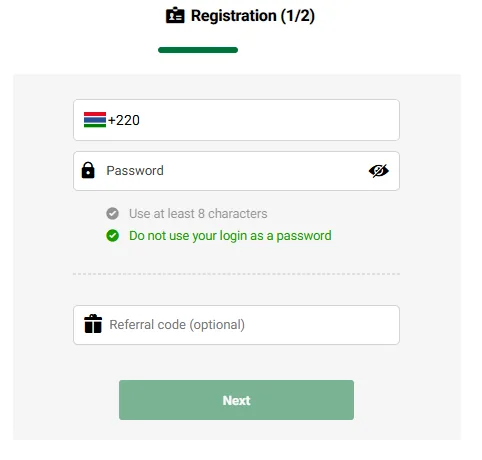
The registration process uses a Gambian mobile number start with +220, a private password and an SMS activation code.
Registration Steps
- Visit the official Gambibet website through a current browser
- Open the registration screen from the main navigation
- Add the Gambian mobile number that will belong to the account
- Choose a password containing eight characters or more
- Review the age and account eligibility requirements
- Submit the registration request
- Wait for the five digit activation message
- Add the received code to the verification field
- Complete validation and open the new account
The SIM connected with the account should remain under the control of the player. It can be needed later for security confirmation and password recovery.
Requesting several activation messages in rapid succession can create confusion because an earlier code may stop working after a new request. The player should wait for the mobile network to deliver the current message before requesting another one.
How to Log In
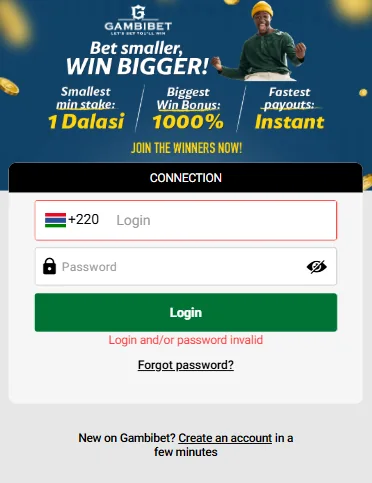
Open the Gambibet website and select Login. Add the registered mobile number and the current password, then submit the form.
A successful login opens the player area and restores access to the balance, transactions and available products. The account should display the same information on mobile and desktop because both devices connect with the same player profile.
The normal login process is
- Open Gambibet from the official website or current PWA
- Select the Login control
- Enter the mobile number registered to the account
- Enter the private account password
- Submit the login request
- Confirm that the personal balance and account area have loaded
A player should not leave the account open on a public or shared device. Sign out after the session and remove any saved login information from a device that other people can access.
Features Available After Login
Account access connects the player with the services attached to the registered profile.
Available account areas can include
- Sports and live betting
- Casino and virtual games
- Open and settled betting tickets
- Deposit and withdrawal controls
- Transaction records
- Personal account information
- Freebet and coupon balances
- Loyalty and referral features
The exact products and payment options shown can depend on current platform availability and account status.
Reasons a Gambibet Login Can Fail
A rejected or incomplete login is not always caused by the password. The problem can begin with the connection, browser, installed PWA, mobile network or account status.
1. Expired Browser Session
A browser can retain an expired authentication token and repeatedly return the player to the login screen. The form may appear to work even though the old session prevents a new one from opening.
Close every Gambibet tab and open the site in a private browser window. If the account opens there, remove the stored Gambibet cookies and site data from the normal browser before trying again.
2. Mobile Connection Changes
Switching between mobile data and wireless internet while the login request is being sent can interrupt communication with the authentication service. The page can remain visible without completing the session.
Connect to one stable network, reopen the page and submit the form once. Repeated taps during a weak connection can create several unfinished requests.
3. Blocked Cookies or JavaScript
Strict privacy settings and some content blocking tools can prevent the website from creating the session required for account access.
Allow the essential site cookies and JavaScript needed by Gambibet. A standard current browser can be used to test whether an extension or privacy setting is causing the issue.
4. Device Date or Time Error
Authentication and security certificates can fail when the phone or computer uses an incorrect date or time. This can happen after a device reset or when automatic time settings are disabled.
Enable automatic date and time for the local network, close the browser and open Gambibet again.
5. Delayed Mobile Verification Message
Activation and recovery depend on SMS delivery. Network congestion, limited signal, an inactive SIM or a full message store can delay the code.
Keep the registered SIM available and use the newest message received. Support should be contacted when messages do not arrive after reasonable attempts.
6. Temporary Platform Maintenance
The login service may be briefly unavailable during maintenance or an external provider interruption. The same failure can then appear on different devices and networks.
Wait before trying again. Changing account details will not resolve a platform interruption.
7. Account Security Review
Gambibet can restrict access while checking identity, payment activity, suspicious login behaviour, responsible gambling measures or a possible rules violation.
A security restriction cannot be bypassed by clearing the browser. The player should contact support and provide the registered mobile number together with a short explanation of what happened.
8. Lost Access to the Registered SIM
A player who no longer controls the registered number may be unable to receive a recovery code. Opening another account is not an acceptable solution.
Support can explain the verification needed to review a change of phone access. Identity and account activity may need to be confirmed before login details are updated.
Recovering Account Access
Password recovery begins from the login screen. Select the forgotten password option and enter the mobile number registered to the account.
Gambibet sends a five digit verification code by SMS. Add the code to the recovery form, choose a new password and enter it again where confirmation is requested.
The new password should be private and different from passwords used for email, mobile money or social media. A person who receives a recovery code without requesting one should contact support because another person may be attempting to access the account.
Closing a Gambibet Account
A player can request closure through Gambibet customer support. The message should come from the registered phone number or connected email when possible.
The player should state whether the request is a normal closure or a responsible gambling restriction. A responsible gambling request should also explain whether a temporary or permanent restriction is needed.
Unused freebets, casino coupons and other promotional balances can be removed when an account is closed. A new profile must not be created after closure because Gambibet rules prohibit duplicate registration and registration by a person with a previously closed account.
Gambibet Login Support
Support can assist when normal recovery does not restore access or when the account is restricted.
Prepare the registered phone number, approximate time of the last successful login, device type and any message shown on the screen. A screenshot can be useful when it does not reveal private security information.
Phone and WhatsApp
+2203035550
+2203035551